Industrial buyers often ask for a handheld thermal camera and discover mid-deployment that what they truly needed was a handheld thermal imaging solution—a device plus reporting software, formats that a CMMS accepts, accessories, training, and SLAs. This pillar guide clarifies the difference, shows where each approach fits, and gives you a specification and rollout playbook tailored for plant maintenance, electrical switchgear, HVAC, utilities, and process facilities.
Table of Contents
ToggleBottom line: if your goal is find → prove → act in under two minutes per asset, the device matters—but the workflow matters more. The right choice is the one your crews can learn in minutes, that produces radiometric evidence your managers trust, and that keeps working on cold nights with gloves on.
1) Terms that confuse purchasing—and how to fix them
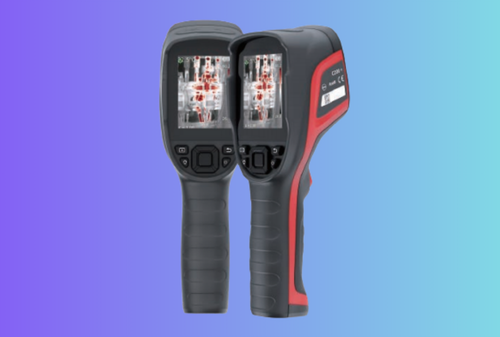
- Handheld thermal camera = a device. It produces thermal images, ideally radiometric (per-pixel temperature) with tools like ΔT, isotherms, and ROI boxes.
- Handheld thermal imaging = a capability/stack: the camera plus software (desktop/app), file formats your systems ingest (PDF, CSV, RJPEG), integration (files-in-folder or API), and services (training, calibration, warranty).
If the task is triage (quick checks), a handheld thermal camera may be enough. If the task is compliance, trending, insurance, or contract proof, you need a handheld thermal imaging solution that ships with templates, metadata, and repeatable procedures.
2) What the plant truly needs on site (from the tech’s point of view)
Technicians measure success in minutes, not megapixels. A handheld that wins on the floor does five things well:
- Starts fast and shows a clear image without diving into menus.
- Measures reliably (ΔT vs. a like component, emissivity presets, reflected temperature when needed).
- Captures a complete set—thermal + visual + short note—without breaking flow.
- Exports a one-page PDF that a CMMS accepts via a watched network folder.
- Runs all shift with hot-swap batteries and gloved controls, even at −10 °C.
Everything in this guide maps back to those five outcomes.
3) Specs you should actually care about (and why)
Thermal sensitivity (NETD)
Lower NETD (e.g., ≤50 mK for fleet work; ≤35 mK for more subtle deltas) lets crews see small temperature differences on bearings, busbar joints, and wet insulation. In practice, better sensitivity means fewer “is it just noise?” moments on light-load gear.
Resolution, optics, IFOV (spot size)
Detector pixels (256×192, 384×288, 640×512) matter, but IFOV—the angular size of one pixel—tells you whether a small lug at 1 m will be more than a blur. As a working rule, aim for ≥3×3 pixels on the smallest critical target at the typical distance. When in doubt, pick manual focus with a short minimum focus distance and keep an optional macro clip-on for small components.
Radiometry & metadata
For audits and maintenance tickets, insist on radiometric images (per-pixel temperature) with embedded emissivity, reflected temperature, ambient, ROI data. Your desktop tool should export PDF + CSV in one click so supervisors can file and trend without re-typing numbers.
Ruggedness, runtime & ergonomics
Industrial handhelds should survive IP54 dust/splash and ~2 m drops. Publish runtime at 20 °C and −10 °C; specify glove-friendly buttons and a tripod/handle accessory for time-series captures.
4) “Camera-only” vs “Imaging solution”: where each fits
| Scenario (industrial) | Handheld thermal camera is enough when… | You need a handheld thermal imaging solution when… |
|---|---|---|
| Electrical MCCs & switchgear | You only need to find hot lugs today | You must trend ΔT, attach radiometric PDFs to WOs, or pass audits |
| Mechanical routes (motors, bearings) | Triage on routine walks | You report ΔT vs ambient, export CSV, and schedule work from data |
| HVAC & building envelope | Quick leak checks | You prove condensation risk (dew-point overlay), add photos to proposals |
| Utilities/process | Visual confirmation | You need ranges to 400–650 °C, batch reports, and API ingestion |
Heuristic: if “proof” appears in your SOP, buy the imaging stack.
5) Spec ladders you can buy against tomorrow
Good (Triage)
- 160×120 or 256×192; wide FOV; fixed focus; NETD ≤ 60–50 mK
- ΔT spot/box; simple isotherm; radiometric optional
- IP54; 3–6 h runtime; USB-C file pull
Better (Workhorse) — default choice for most plants
- 256×192 or 384×288; manual focus or short MFD; NETD ≤ 50–35 mK
- Radiometric images; ΔT, multi-ROI, isotherm; one-click PDF/CSV
- IP54–IP65; 6–8 h @ 20 °C; publish cold runtime; glove-friendly
Best (Evidence/Engineering)
- 640×512; lens options (wide/normal/tele + macro); NETD ≤ 35–25 mK
- Full radiometry; batch reporting; long-range ranges (to 650 °C)
- IP65+; calibration certificate; depot exchange SLAs
6) What people actually find with these tools (and how to act fast)
A handheld thermal camera sees patterns caused by physics, not the cause itself. Map the pattern to an action:
- One lug hotter than neighbors → clean, re-terminate, torque to spec
- Uniformly hot conductor vs. others → check loading and conductor sizing
- Hot bus splice stripe → pressure loss/contamination; re-torque/replace hardware
- Warm neutral bar → harmonics or loose neutral; verify with meters
- Compartment uniformly warm → ventilation issue; clean filters/restore airflow
- Bearing end hot → lubrication, load, or alignment; inspect and schedule service
Keep the rule-of-thumb thresholds simple for crews: ΔT ≈ 10–20 °C vs a like component → inspect; ≥ 30 °C → urgent. Record ambient and load for context.
7) Field workflow that works in any plant (copy/paste into SOPs)
Before the round (5–7 min): batteries (two), quick NUC, lens clean, set operator/site IDs, palettes limited to white-hot/black-hot/ironbow, emissivity presets (painted steel 0.95, oxidized copper 0.78).
At each asset (≤ 90 s): auto span → lock; spot on suspect, box on healthy → ΔT; palette flip; capture thermal + visual + 5-second voice note (panel, phase, ΔT, load).
After the round (10–15 min): import radiometric JPEGs, generate one-page PDFs with cover summary; drop into CMMS watched folder.
8) The selection decision—expressed like a plant buyer, not a brochure
Distance & target size
If the smallest thing you care about is a 5 mm lug at 1 m, you need a spot smaller than 5 mm—achieved with resolution and lens together. Don’t buy pixels; buy IFOV appropriate to your working distance.
Temperature span
Two spans cover most work: −20…150 °C for general inspections and 100…650 °C for hot process points. Switching span should be obvious and not reset your palette/lock every time.
Accessories that change behavior
A macro clip-on turns borderline close-ups into clear evidence on small components. A short tripod/handle makes time-series captures (e.g., “watch this bearing for 10 minutes”) painless. A wrist lanyard prevents drops when you’re on ladders.
Software that saves admin hours
Desktop software should open instantly, adjust palette/span, drop spots/boxes, export PDF + CSV—and never crash. Mobile apps are for live view, quick annotation, and OTA updates; leave deep configuration to the device or PC.
9) Emissivity & reflected temperature (the only “theory” crews must know)
Shiny metals (copper, aluminum) reflect IR. To get a reliable number:
- Place a high-emissivity tape/paint dot on or next to the part; measure the tape.
- Set emissivity in the camera (painted steel ≈ 0.95; oxidized copper ≈ 0.78; bright aluminum ≈ 0.30–0.40 with tape preferred).
- Enter reflected apparent temperature (often close to ambient indoors).
- Keep span lock for comparison shots; otherwise auto-span will mask differences.
10) A procurement matrix you can drop into an RFP
| Requirement | Pass/Fail threshold | Why it matters on site |
|---|---|---|
| Radiometry | Per-pixel temperature in image (RJPEG or equivalent) | Enables trending, audits, and evidence-ready PDFs |
| NETD | ≤ 50 mK (workhorse); ≤ 35 mK (sensitive) | Separates true anomalies from noise |
| Accuracy | ± 2 °C or ± 2% | Keeps readings within spec for maintenance decisions |
| IFOV | Vendor must publish & show spot-size table | Ensures small parts are truly resolved |
| UI | One-tap palette/zoom/capture; explicit span lock | Speeds field work; prevents auto-span “lies” |
| Ruggedness | IP54, ~2 m drop | Survives vans, ladders, dusty rooms |
| Runtime | Publish @ 20 °C and @ −10 °C; hot-swap | Avoids dead tools at night/cold |
| Desktop tool | One-click PDF + CSV, radiometric read | Cuts admin time; easy CMMS ingest |
| Service | Calibration certificate; RMA ≤ 10 business days | Protects data integrity & uptime |
11) A simple ROI model your finance lead will accept
Assume a workhorse handheld thermal camera saves 10 minutes per asset on 6 inspections/day over 20 days/month. That’s ~20 hours/month. At a blended $50/hour, one device frees ~$1,000/month of labor capacity. Even a mid-range imaging stack pays for itself in months—before counting fewer emergency callouts and better-documented upsells.
Tip: add a KPI like “% jobs with attached PDF”—target ≥ 80% by week 4. When that graph rises, the program is working.
12) Where “thermal camera” stops and “thermal imaging” must begin (use-case deep dive)
A) Electrical switchgear rooms
Camera only? Yes—for immediate triage during light-load rounds.
Imaging stack? Required—when you trend ΔT across months, anchor remedial work, or support insurance. You’ll want radiometric PDFs, CSV, and asset/WO IDs embedded as metadata.
Spec notes: 384×288 with manual focus and NETD ≤ 50–35 mK resolves most lugs at 0.7–1.5 m.
B) Motors, bearings, and couplings
Camera only? Acceptable for “is something wrong?” checks.
Imaging stack? Preferred for reliability programs; managers want ΔT vs ambient and repeatable points. A macro clip-on pays for itself here.
C) HVAC & building envelope
Camera only? Fine for quick leak hunts.
Imaging stack? Recommended for condensation conversations with clients; dew-point overlay and before/after PDFs sell remediation.
D) Plumbing & slab leaks
Camera only? Try first.
Imaging stack? Desirable in premium jobs; you’ll want ΔT annotations and macro for valve boxes.
E) Process & utilities
Camera only? If you just need a look.
Imaging stack? Essential for ranges to 650 °C, time-series, batch reports, and interfaces to historian/CMMS.
13) Visuals that help buyers understand (add these to your page)
A. Decision matrix (one screen, keeps bounce low)
| Role | If the user says… | Recommend |
|---|---|---|
| Maintenance tech | “I just need to find hot spots.” | Handheld thermal camera (Good) |
| Reliability engineer | “I’m trending bearing health across quarters.” | Handheld thermal imaging (Better) |
| Electrical supervisor | “I need ΔT proof in every work order.” | Handheld thermal imaging (Better/Best) |
| HVAC contractor | “I must show risk of condensation.” | Handheld thermal imaging (Better) |
| Plant manager | “We need reports IT will accept.” | Handheld thermal imaging (Better/Best) |
B. Example IFOV sizing (illustrative)
| Target | Typical distance | Minimum spot on target | Practical advice |
|---|---|---|---|
| 5 mm lug | 1.0 m | < 5 mm | Choose higher resolution or macro |
| 25 mm bearing cap | 0.8 m | < 10 mm | Manual focus beats fixed focus |
| 1 m duct seam | 1.5 m | < 50 mm | Wide FOV helps whole-surface scans |
These numbers illustrate the method: ensure the smallest target is covered by multiple pixels at the distance you’ll actually use.
C. Simple “time saved” chart (pilot KPI)
14) Internal links that keep readers exploring (pre-wired)
- Platform core: Thermal Camera Module
- Integration & reporting: Thermal Camera Module Integration
- Inspection focus: Handheld Thermal Inspection Camera Brief
- Trust signals: Quality Program · Warranty & After-Sales · Contact
15) Frequently asked questions (SEO long-tails, B2B phrasing)
Is a 640×512 handheld always better?
Only if your IFOV at working distance resolves the smallest target and you need the extra crop room. For many routes, 384×288 with manual focus and low NETD is the sweet spot.
Do I need a mobile app?
Not strictly. Crews love a boring-reliable desktop tool that reads radiometric images and exports PDFs/CSVs. Mobile is best for live view, quick notes, and OTA updates.
What ΔT counts as a “problem”?
Context rules, but many programs treat 10–20 °C vs a like component as “inspect” and ≥ 30 °C as “urgent,” adjusted for ambient and load.
Can we measure through IR windows?
Yes—apply the window’s transmission factor and keep comparisons consistent (through-window vs through-window).
How often should we calibrate?
Annually for most fleets. Include a calibration certificate in the PO and keep one spare per ten units to cover RMA/maintenance.
16) Summary—what to buy, what to skip, what to standardize
- Buy a handheld thermal imaging stack (not just a handheld thermal camera) when you need proof: radiometric images, one-tap PDFs, CSV for CMMS, and a training script crews can learn in 30 minutes.
- Skip feature sprawl: keep palettes to three, surface the span lock, and make ΔT/isotherm one tap away.
- Standardize across SKUs so UI, batteries, and file names are identical from Good → Better → Best. That’s how you scale without re-training.
Build a handheld program your crews actually use
Ship a workflow, not just a device. We’ll help you choose a handheld thermal camera where it makes sense, and upgrade to a complete handheld thermal imaging stack where proof and integrations matter. Start from our proven Thermal Camera Module, use our fast-turn Integration Playbook, and talk to our team to plan your Good/Better/Best rollout, pilot KPIs, and one-page report templates.