When a data center slows down, it is often not because CPUs are out of power, but because they are too hot. Modern servers automatically throttle or even shut down when temperatures rise beyond safe limits. Before that happens, hotspots quietly build up on rack inlets, busways, PDUs and UPS rooms.
Table of Contents
ToggleMost facilities already have temperature probes, BMS alarms and occasional handheld thermal inspections. But these tools miss transient hotspots and gradual drifts that appear between inspection rounds. That is where thermal imaging modules come in. When built into fixed cameras or compact arrays, they give operators a 24/7 thermal “X-ray” of the entire white space and power train, long before hardware throttles or fails.
This article explains how to use thermal imaging modules for data center fire prevention, performance optimisation and predictive maintenance—from layout design to module specs and integration with DCIM. It is written from an OEM perspective, based on Gemin Optics’ experience designing thermal camera modules and industrial online thermal imaging systems for mission-critical environments.
1. Why data centers need continuous thermal imaging
1.1 Throttling and hidden hotspots
Even in well-designed facilities, airflow is never perfect. Small layout changes, patch-cord clutter, blocked perforated tiles or failed fans can create pockets of hot air. Local inlet temperatures rise, servers throttle to protect themselves, and application performance drops.
Traditional temperature sensors only tell part of the story. A single sensor at the top of the rack may read within spec while the bottom server pulls in much hotter air. Thermal imaging lets you see the entire temperature distribution across a rack or aisle, revealing issues like:
- hot columns where airflow bypasses;
- recirculation from hot aisle to cold aisle;
- overheated switch ports or PDUs that are not instrumented.
1.2 Electrical and mechanical failure prevention
Busways, switchgear, UPS cabinets and transfer switches can develop hotspots due to loose connections or imbalanced loads. If unchecked, these can lead to insulation damage, arcing or even fires.
Handheld thermal inspections are useful, but they depend on human schedules and access. A joint between two busbars might stay below alarm thresholds during scheduled testing but overheat during a later peak demand.
Fixed thermal cameras built around robust thermal imaging modules can watch these components continuously and trigger early alarms when joints or cables deviate from normal patterns—even if temperatures are still within nominal limits.
1.3 Regulatory and insurance pressures
Insurers and standards bodies increasingly ask for documented preventive measures in critical facilities. Thermal imaging offers:
- recorded evidence that the operator monitors power and cooling equipment;
- hard data on temperature trends;
- visual documentation useful in incident investigations.
For colocation data centers, this can become a key selling point when negotiating SLAs with enterprise customers.
2. What is a thermal imaging module in the data center context?
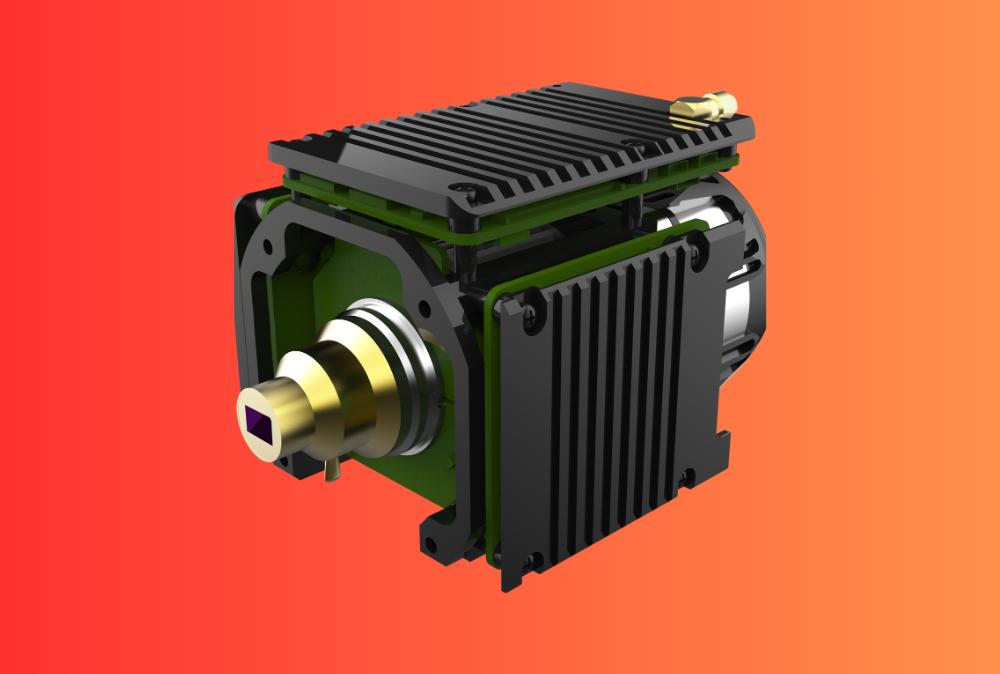
A thermal imaging module is the OEM “engine” inside a thermal camera: an uncooled LWIR microbolometer sensor, optics, electronics and firmware, designed to be integrated into custom housings and systems.
In data centers, these modules can be used in several ways:
- inside ceiling-mounted fixed cameras watching racks or aisles;
- embedded in compact enclosures for switchgear and UPS monitoring;
- as the core of handheld imagers used by maintenance teams;
- in scanning systems derived from industrial online thermal monitoring.
Compared with finished consumer devices, modules give integrators more flexibility over:
- lens choices and field of view;
- network interfaces and power;
- environmental protection and mounting;
- integration with DCIM, BMS and AI analytics.
3. Typical data-center hotspots thermal imaging can reveal
3.1 IT racks and server inlets
On the IT side, thermal cameras primarily focus on airflow and inlet temperatures:
- cold aisles: mapping inlet temperatures for each rack position,
- hot aisles: checking exhaust temperatures and bypass paths,
- top-of-rack switches: detecting localised overheating from high utilisation,
- blade chassis and dense GPU servers: identifying uneven loading.
Seeing the full thermal picture across racks helps operators adjust tile layouts, blanking panels and containment systems.
3.2 Power distribution and switching
In the power train, thermal modules monitor:
- busways and tap-off boxes;
- UPS input/output terminals and internal connections;
- PDUs, RPCs and breaker panels;
- transfer switches and generator switchboards.
Loose or corroded joints typically show up as hotter than neighbouring connections, even before insulation discolours. Continuous thermal monitoring provides early warning so maintenance can tighten or replace parts during planned windows.
3.3 Cooling systems
CRAC/CRAH units, in-row coolers and rear-door heat exchangers are all candidates for thermal monitoring. Cameras can watch:
- coil surfaces to detect fouling or uneven loading;
- condenser and chiller components;
- valve and pump casings.
By trending these temperatures, operators can detect loss of performance, refrigerant problems or failing fans before they affect IT temperatures.
3.4 UPS batteries and DC systems
Where data centers still use lead-acid or lithium UPS banks, thermal imaging helps identify:
- failing cells and strings;
- imbalanced charge states;
- hotspots on battery busbars and DC disconnects.
These are similar to BESS applications, but usually indoors and at smaller scale.
4. Designing a thermal imaging strategy for data centers
4.1 Handheld vs online thermal monitoring
Most sites already own at least one handheld thermal imager. It is a flexible tool for periodic inspections, but it has limitations.
A simple comparison:
| Aspect | Handheld thermal inspections | Fixed online thermal imaging |
|---|---|---|
| Coverage | Selected points during a visit | Continuous coverage of defined areas |
| Temporal resolution | Depends on inspection schedule | 24/7, capturing transient events |
| Operator workload | Requires skilled staff on site | Centralised monitoring; fewer manual rounds |
| Documentation | Manual capture of images | Automatic logging and trending |
In practice, the best approach is hybrid: fixed cameras watch critical points continuously, while handheld devices support troubleshooting and detailed inspections. Both can share the same thermal camera module family, simplifying maintenance and calibration.
4.2 Placement strategies in server rooms
For white space, common layouts include:
- ceiling-mounted cameras above cold aisles, looking down at rack fronts;
- cameras at the ends of aisles, viewing along the row;
- overhead cameras above hot aisles to monitor exhaust and containments.
Key design considerations:
- field of view must cover all rack faces without excessive perspective distortion;
- resolution must allow each inlet region to occupy enough pixels for reliable statistics;
- cameras must avoid direct glare from lights or reflective surfaces.
Using compact modules allows integrators to build small housings that fit between cable trays and lighting fixtures, minimising shadowing.
4.3 Monitoring power and mechanical rooms
In critical electrical rooms, thermal cameras are typically:
- mounted on walls facing open switchgear fronts or closed cabinet doors;
- installed above busway runs looking down at tap-off points;
- positioned to see cable terminations and busbar joints.
For equipment that cannot be easily accessed during operation, such as MV switchgear, thermal windows or IR viewing panes can be installed and viewed by fixed cameras. Again, modules from Gemin’s thermal camera module line can be tailored for these enclosures.
5. Key module specifications for data-center use
5.1 Resolution and optics
For typical data-center distances (2–10 m), resolutions of 384 × 288 or 640 × 512 with 9–13 mm lenses work well. They balance detail with manageable cost.
Higher resolution is valuable when:
- a single camera must cover long aisles;
- you want to define many ROIs—per rack, per U-position or per breaker.
5.2 NETD, accuracy and temperature range
Data centers care about small temperature differences, not extreme heat. That means:
- NETD ≤ 40–50 mK is desirable to clearly distinguish 1–2 °C differences between servers;
- accuracy of ±2 °C or ±2% in the 15–80 °C range is usually sufficient;
- dynamic range should handle both cool inlets and hotter exhausts or switch contacts.
Modules derived from industrial online thermal imaging systems already meet these requirements, making them strong candidates for data-center deployment.
5.3 Interfaces and integration
To integrate with DCIM and BMS, thermal modules should offer:
- digital video outputs (Ethernet, MIPI, LVDS) compatible with embedded processors;
- SDKs for controlling palettes, AGC and measurement ROIs;
- options for radiometric data export over TCP/IP or industrial protocols.
This allows system builders to push temperatures into existing DCIM dashboards, trend databases and alarm systems, rather than creating a separate silo.
5.4 Reliability and quality control
Data centers expect 24/7 operation with minimal downtime. OEMs should therefore demonstrate:
- factory burn-in and aging tests on modules and boards;
- thermal cycling and vibration testing;
- traceable calibration and quality control processes aligned with IEC/ISO standards.
These measures help ensure that cameras remain stable over years of continuous duty in equipment rooms that may themselves run hot.
6. Integrating thermal imaging into DCIM, BMS and AI analytics
6.1 Alarm logic and thresholds
Unlike simple thermostats, thermal systems provide rich spatial data. Good designs use that richness intelligently, combining:
- absolute thresholds (e.g., “inlet above 27 °C”);
- relative thresholds (“rack hotter than neighbours by more than 5 °C”);
- rate-of-rise rules (“temperature rising more than 3 °C in 5 minutes”).
Using ROIs per rack, breaker or busbar, you can generate alarms that focus attention on patterns that matter, reducing false positives from ambient swings.
6.2 Data models and APIs
For GEO-style applications and AI analytics, thermal data should be accessible in machine-friendly ways:
- labelled ROIs with equipment identifiers;
- timestamps synchronised with other monitoring systems;
- structured metadata (camera ID, lens, temperature range, calibration version).
An OEM supplier should provide clear APIs so your own DCIM or AIOps platforms can treat thermal streams as just another data source, alongside power, IT telemetry and environmental sensors.
6.3 Using thermal data for capacity planning and optimisation
Beyond fire and failure prevention, thermal images help optimise:
- rack densities and placement of high-power loads;
- setpoints and control strategies for CRAC/CRAH units;
- airflow management investments (containment, blanking panels, floor tile layout).
Over months, you can correlate hotspots with workload patterns and infrastructure changes, making more informed decisions about where to add capacity or upgrade cooling.
7. Working with Gemin Optics as your OEM/ODM thermal partner
For data-center integrators and equipment manufacturers, the challenge is not just choosing a sensor—it is building complete, reliable solutions that fit into their product portfolio and service model.
As a China-based manufacturer, Gemin Optics offers:
- configurable thermal camera modules for rack, switchgear and mechanical-room monitoring;
- rugged industrial online thermal imaging systems that can be adapted for data-center use;
- flexible OEM/ODM cooperation for custom housings, interfaces and analytics-ready outputs;
- documented testing, calibration and service support to help you meet your own SLAs.
For project-level discussions or joint solution design, data-center customers can reach out via the Gemin Optics contact page or through regional partners listed on the site.
8. FAQ: Thermal imaging modules for data centers
Q1. How many thermal cameras are needed for a typical server room?
It depends on room size and required granularity. As a rough guide, small rooms may manage with two to four cameras covering racks and switchgear. Large halls might deploy one camera per two to three aisles, plus additional units in electrical rooms.
Q2. Can thermal imaging replace all temperature sensors in a rack?
No. Spot sensors and BMC readings are still valuable for direct control. Thermal imaging provides context and coverage, showing airflow paths and relative differences. The two approaches complement each other.
Q3. Will thermal cameras be confused by glass doors on racks?
Standard LWIR cameras cannot see through glass. For racks with glass doors, cameras should view from angles that see metal frames or use open or mesh-door designs. Alternatively, thermal “ports” can be added for cabinet inspection.
Q4. What about privacy or security concerns?
Thermal images show heat patterns, not personal details. They are generally considered low-risk from a privacy standpoint, which simplifies deployment in areas where staff may be present.
Q5. How often do thermal systems need recalibration?
Well-designed modules with stable calibration methods can operate for years without recalibration. However, annual verification against reference points (for example, known-temperature surfaces) is good practice in mission-critical environments.
Q6. Can one thermal system monitor both data-center and substation equipment?
Yes. Many operators use the same core technology to watch transformers, switchyards and battery systems, reusing analytics and integration logic across facilities. That is one advantage of building solutions on an industrial thermal imaging platform.
CTA – Bring Thermal Imaging into Your Data Center Monitoring Stack
As rack densities rise and uptime expectations tighten, relying solely on point sensors and handheld inspections is no longer enough. Thermal imaging modules turn invisible heat patterns into actionable data, helping you catch hotspots before servers throttle, cables fail or breakers trip.
If you are designing new facilities or upgrading existing ones, consider how OEM-grade thermal modules and online systems could fit into your DCIM and maintenance strategy. Visit Gemin Optics to explore our thermal camera modules, review our industrial online thermal monitoring solutions, and contact our team to discuss a thermal architecture that aligns with your SLAs and long-term capacity plans.