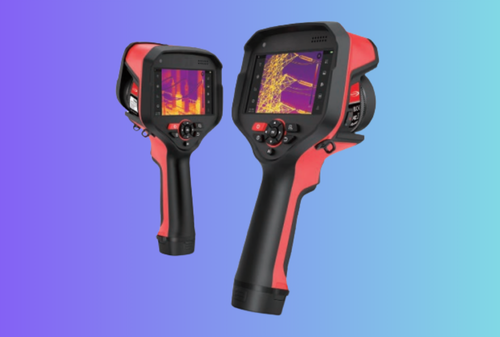
If you walk through a live switchgear room with an industrial thermal camera, you quickly learn it’s not a “cool picture” tool—it’s a fast, non-contact way to expose resistive losses, imbalance and hidden ventilation problems before they cascade into trips or arc-flash events. Below is a practical, B2B-focused guide to what you’ll actually see, why it happens, how to confirm it, and how to turn images into action that plant managers understand.
Table of Contents
ToggleThe short list of faults you’ll see most often
Thermal cameras don’t see electricity; they see heat patterns caused by electrical or mechanical issues. In switchgear rooms, nine patterns account for most actionable findings:
- Hot lugs and bolted joints – high resistance from loosened torque, oxidation, or strand damage.
- Phase imbalance – one phase consistently hotter at similar load; often load distribution or harmonics.
- Overloaded feeders – conductor run uniformly hot vs neighbors; label + cable size mismatch common.
- Contact wear in breakers/disconnects – localized burn pattern at contact points.
- Busbar splice issues – asymmetric hot zones across a splice plate; pressure loss or contamination.
- CT/PT connections – small, sharp hot spots on instrument transformer terminals.
- Neutral/ground problems – unexpected heating on neutral bar; harmonic currents or loose neutral.
- Ventilation/airflow faults – whole section runs warm because filters or louvers are blocked.
- Insulator contamination/tracking – warm streaking along insulators under dust/humidity load.
Each of these has a characteristic thermal “look.” The sections below translate pictures into actions.
Field workflow: how pros scan a gear lineup (fast & repeatable)
- Safety first. Respect arc-flash boundaries, PPE, and local rules. If you use IR windows, verify their transmission and correction factors.
- Baseline notes. Ambient temperature and load conditions (amps if visible on meters). Capture a wide reference image of each lineup.
- Auto → Lock. Use auto span to find the pattern, then lock span/level before comparison shots so images are comparable.
- Compare like to like. For each enclosure: place a spot on the suspect and a box on a similar, healthy phase. Read ΔT.
- Confirm with a second palette. White-hot first, then black-hot or ironbow; some faults pop better with inversion.
- Capture a set. Thermal + visual + short voice note (panel ID, phase, ΔT, load).
- Suggest action. Torque check, clean/re-terminate, load-balance, or monitor with interval.
Quick rule of thumb many programs use: ~10–20 °C ΔT vs. a like component merits inspection; ≥30 °C is urgent. Context (load, ambient) always matters.
What your images mean (and what to do next)
| What you see | Likely cause | Confirm | Action | Risk if ignored |
|---|---|---|---|---|
| One lug much hotter than the other two on the same breaker | Loose/over-torqued connection, oxidation, strand break | Repeat after span lock; check with clamp meter for equal current | De-energize, clean, re-terminate to spec; replace damaged lug | Progressive heating → insulation damage → trip or arc |
| Uniformly hot conductor vs neighbors | Overload or undersized cable | Compare label vs measured load; check OCPD settings | Re-size conductor or balance loads | Nuisance trips; shortened insulation life |
| Hot stripe across bus splice | Pressure loss, plate contamination | Inspect torque records; check plate cleanliness | Re-torque to spec; clean/replace hardware | Localized overheating → failure at splice |
| Local hot spot at breaker jaw or knife switch | Contact wear, pitting, poor pressure | Look for asymmetry across poles | Service/replace contact set | Contact failure under fault conditions |
| Neutral bar warmer than expected | Harmonic currents, loose neutral | Check loads with clamp on neutral; inspect termination | Correct loose neutral; mitigate harmonics | Nuisance trips, overheating of neutral |
| Whole compartment warm | Blocked airflow; filter clog; louver closed | Compare neighboring bays; inspect fans/vents | Restore ventilation, clean filters | Ambient rise accelerates all aging |
| Warm trails along insulator | Contamination, moisture tracking | Visual check; humidity conditions | Clean, improve sealing | Flashover under humidity peaks |
Getting reliable numbers (not just nice pictures)
Emissivity & reflections. Copper and aluminum are reflective. To measure, place a small high-emissivity tape/paint dot and read the tape, not the shiny metal. Enter the emissivity (ε) in camera settings—painted steel ≈ 0.95, oxidized copper ≈ 0.78, bright aluminum can be 0.30–0.40 (use tape).
Reflected temperature. Near mirror-like parts, set reflected apparent temperature (what the surface “sees”). Even a rough estimate (ambient) is better than ignoring it.
IFOV and spot size. Ensure your spot covers ≥3×3 pixels of the target at your distance, otherwise readings average in background.
Span discipline. For trending, don’t let auto-span make every frame look “perfect.” Lock span and record the value in your report.
Which camera specs actually matter in switchgear
- Resolution & optics. For 0.5–1.5 m standoff on lugs and joints, 256×192 or 384×288 is workable; 640×512 gives more margin on small targets. A normal FOV (≈24–35° HFOV) is a good default; manual focus or short MFD helps on small components.
- NETD (thermal sensitivity). Aim for ≤50 mK; ≤35 mK sharpens small ΔT findings under light load.
- Radiometry. You want radiometric JPEG (per-pixel temperature) and a desktop tool that drops PDFs + CSV into a CMMS watched folder.
- Ruggedness & power. IP54, 2 m drop, hot-swap batteries, and runtime published at 20 °C and −10 °C.
- UI. One-press palette / zoom / capture, isotherm and ΔT one tap away, and a clear span lock indicator.
- Accessories. Wrist lanyard, short handle/tripod, and (if your policy requires closed-door scanning) IR windows with known transmission.
A simple, repeatable route for your crews
Electrical Panel Quick Card (print this):
- PPE and permits checked; IR window if door closed
- Auto span → Lock; distance 0.7–1.5 m
- Spot on suspect lug; box on healthy phase → ΔT
- Palette flip (white-hot ↔ black-hot); capture thermal + visual
- Voice note: Panel, bucket, phase, ΔT, load
- Add work-order ID to filename
What counts as “proof” in reports
A one-page report that operations will accept every time includes:
- Thermal image with fixed palette/span, ROIs and ΔT labels
- Visible inset for context
- Emissivity and reflected temp entries
- Ambient temperature; operator; device ID; timestamp
- Simple recommendation: retorque, clean & re-terminate, load balance, monitor
- Unique work-order ID in header and file name
Edge cases you’ll meet (and how to read them)
- Harmonics vs. overload. A neutral bus or transformer top running warm with balanced phase conductors can point to harmonic currents (nonlinear loads). Pair thermal with a meter capable of THD to confirm.
- Intermittent loads. Don’t condemn a cold joint at light load—log context. If a bus splice is suspect but cool, return during peak.
- Solar gain. Afternoon sun on an exterior wall behind gear will lift apparent temps. Always jot down sun/wind notes.
- IR window losses. If you measure through a window, know its transmission and correction; never compare “through-window” ΔT directly to “door open” imagery without noting it.
Training that makes a difference (30 minutes to proficiency)
- Teach three palettes only (white-hot, black-hot, ironbow) and when to use each.
- Drill auto → lock and spot/box ΔT until it’s muscle memory.
- Give a 2-minute demo script to every new tech: power → palette → scan edges → ΔT → capture set → voice note.
- Keep a laminated emissivity crib in the case.
ROI: why plant managers fund thermal routes
Two numbers usually sell the program:
- Time-to-first-actionable image: With a practiced route, a tech should produce a labeled thermal+visual set in <90 s per asset; over a day this frees hours.
- First-time fix rate: Labeled ΔT evidence helps maintenance plan the right torque/retorque or conductor swap on the first visit, cutting call-backs.
A conservative model: saving 10 minutes on 6 panels/day × 20 days ≈ 20 hours/month of technician time. At a blended $50/hr, that’s $1,000/month of capacity per camera—before you count avoided trips.
Common mistakes (design them out of your program)
- Buying pixels, not IFOV. Make sure your spot fully covers the target at working distances.
- Letting auto-span lie. Lock span for compare/trend work.
- Ignoring cold runtime. Publish 20 °C and −10 °C numbers; plan hot-swap.
- No radiometry. Pretty pictures that can’t be measured lead to arguments.
- UI sprawl. Hide advanced menus; keep fight-mode controls simple and glove-friendly.
Recommended internal links (keep readers in your ecosystem)
- Build on a stable core: Thermal Camera Module
- Speed up integration & reporting: Thermal Camera Module Integration
- For broader plant checks: Handheld Thermal Inspection Camera Brief
- Trust signals: Quality · Warranty & After-Sales · Contact
FAQ (long-tail, B2B-friendly)
Do we need 640×512 for switchgear?
Not always. For 0.7–1.5 m standoff, 384×288 with good optics and ≤50 mK NETD resolves most lugs. Go 640 when you must read smaller hardware at longer distances or crop heavily.
Can we measure through IR windows?
Yes, but apply the window’s transmission correction and keep your ΔT comparisons consistent (through-window vs through-window, door vs door).
What ΔT is “critical”?
Programs vary. As a practical guide: 10–20 °C vs a like component → investigate; ≥30 °C → urgent. Always consider load and ambient.
How often should we scan?
Monthly on critical gear; quarterly on standard panels; after any major load change or disturbance.
CTA
Turn switchgear images into decisions in under two minutes. Build your plant route with a dependable industrial thermal camera, a glove-first UI, honest cold runtime, and one-tap PDF reports your CMMS accepts. Start from our proven thermal camera module, use our integration playbook, and talk to our team to kit your electrical lineup today.